A Read-Only NocoDB Dashboard for a Database on Another Machine
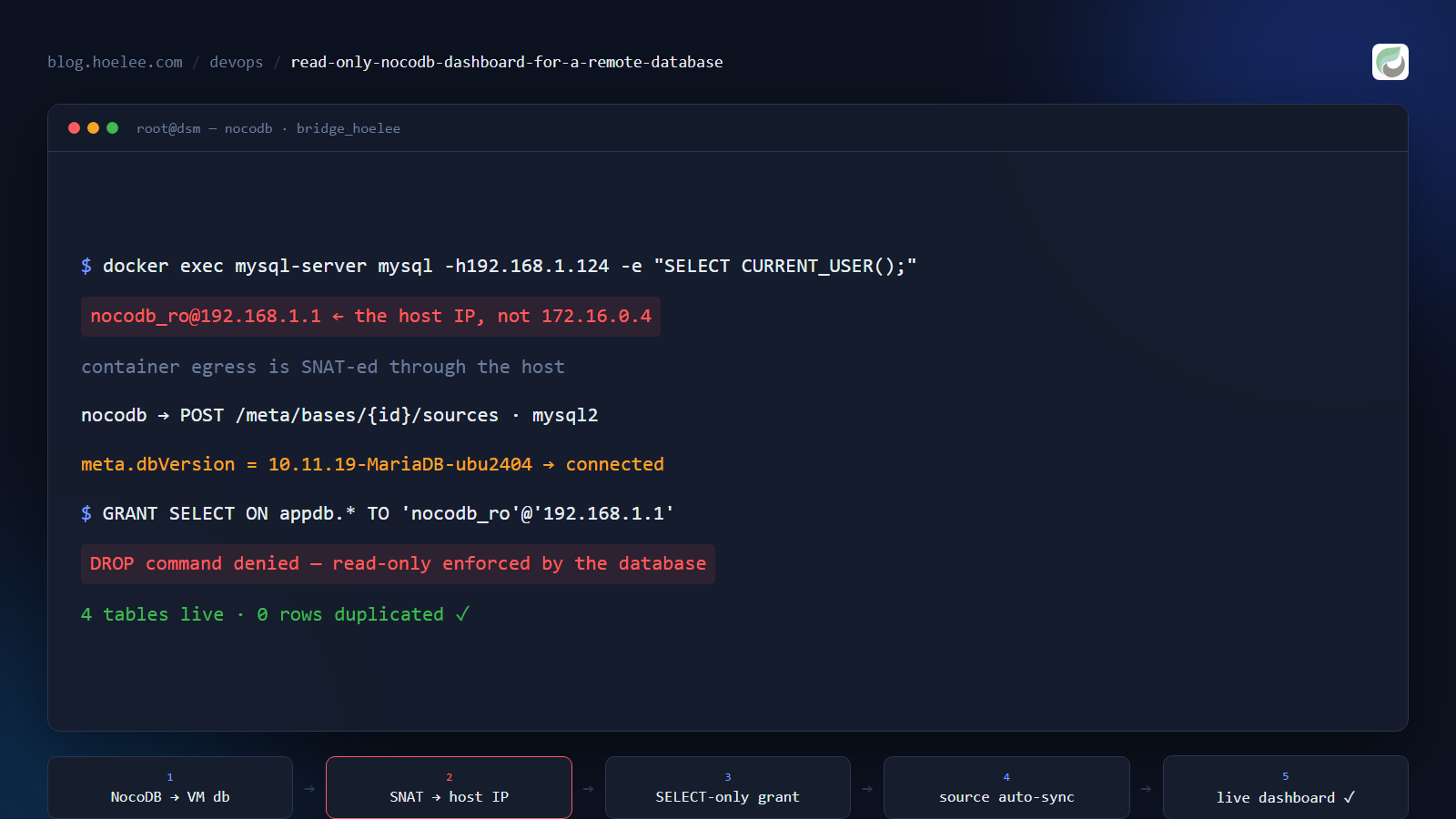
My report app writes every lead and every order into MariaDB running on a small VM. The person who actually runs the business wanted to look at those rows — filter them, sort them, export them — without SSH-ing into the VM and without asking me every time.
The obvious answer is a spreadsheet-style admin UI. The wrong answer is a second copy of
the data. This post is the recipe I ended up with: NocoDB pointed straight at the real
database, through an account that can only SELECT — plus the three traps that cost me
the afternoon, one of which is a Docker networking fact that will bite you in any
container-to-LAN setup, not just this one.
Why not sync the rows into NocoDB?
There were three ways to get the owner a dashboard, and I want to be honest that the other two are legitimate — they just cost something:
- Push every row to NocoDB’s API as the app writes it. Two writes per record, error handling on both, and the dashboard silently drifts the first time a push fails. The dashboard becomes a second system of record that is usually right.
- A cron job that syncs rows every N minutes. Same duplication, plus a staleness window, plus a “which side won?” problem when someone edits a row in the dashboard.
- Point NocoDB at the database as an external source. Zero duplication, always live, one connection config. The dashboard is the database, viewed differently.
I took option 3. The cost is real and worth stating up front: the database’s port has to be reachable from wherever NocoDB runs, and NocoDB now holds a database credential. Both are acceptable if the credential is a read-only account limited to one host — which is exactly what the rest of this post builds.
The trap nobody warns you about: which IP the database sees
This is the part I got wrong first, and it is not NocoDB-specific.
My NocoDB runs in Docker on a Synology NAS, on a user-defined bridge network
(bridge_hoelee, container IP 172.16.0.4). The MariaDB it needs to reach lives on a
different machine at 192.168.1.124 — outside the bridge subnet.
My first instinct was to grant the account to the container subnet:
-- WRONG (well, useless): the container's own IP is not what the server sees
CREATE USER 'nocodb_ro'@'172.16.0.%' IDENTIFIED BY '<password>';
It never matched. When a container connects to an address outside its bridge network,
the traffic is NATed out through the host — Docker’s masquerade rule rewrites the source
address to the host’s IP. The database sees 192.168.1.1 (the NAS), not
172.16.0.4 (the container).
Don’t reason about it, measure it. One SELECT from any container on the same bridge
tells you the truth, and it takes ten seconds:
docker exec mysql-server mysql -h192.168.1.124 -unocodb_ro -B -e "SELECT CURRENT_USER();"
# [email protected]        <- the host IP, not the container IP
(Pass the password through MYSQL_PWD rather than -p<password>: on the command line it
ends up in ps output and your shell history.)
Once you know the source address, the grant writes itself — one host, one schema, one privilege:
CREATE USER 'nocodb_ro'@'192.168.1.1' IDENTIFIED BY '<password>';
GRANT SELECT ON appdb.* TO 'nocodb_ro'@'192.168.1.1';
FLUSH PRIVILEGES;
Two rules I’d apply to any dashboard account:
- Never reuse the application’s own database user. The app’s account can
INSERT,UPDATEandDELETE; the dashboard’s cannot. If the dashboard credential leaks out of a browser session, the blast radius is “someone can read rows”, not “someone can rewrite the business”. - Grant to the exact source address, not a wildcard.
'192.168.1.1'is one line, and it survives aSHOW GRANTSreview.
Creating the external source through the API
NocoDB (image nocodb/nocodb:2026.09.0 in my case, listening on 10380) exposes a meta
API; the workspace token lives in the nc_api_tokens table of its own meta database. The
call that creates an external MySQL source looks like this:
curl -s -X POST "$NC/api/v2/meta/bases/$BASE/sources" \
  -H "xc-token: $TOKEN" -H 'Content-Type: application/json' \
  -d '{
        "type": "mysql2",
        "title": "app-vm",
        "config": {
          "client": "mysql2",
          "connection": {
            "host": "192.168.1.124", "port": 3306,
            "user": "nocodb_ro", "password": "<password>",
            "database": "appdb"
          }
        }
      }'
# {"id":"joblzodc9u91flnkw"}
Two things about that response are surprising:
- You get a job id, not a source. Source creation is asynchronous. There is also
no job-status route — I probed
/api/v2/jobs/{id},/api/v1/db/meta/jobs/{id},/api/v2/meta/jobs/{id}and/api/v1/jobs/{id}, and all four are 404. Don’t sit there polling; verify the outcome instead. - It auto-syncs every existing table of that database into the base. You do not add tables one by one. A few seconds later the base already contained all four of my tables.
The verification I settled on reads the source list and looks at meta:
source budabxoawz5lwn9 type=mysql2 order=1 meta=None
source b2sdp3iw0ed1bgo type=mysql2 order=2 meta={'dbVersion': '10.11.19-MariaDB-ubu2404'}
That dbVersion is echoed from the target server, so it doubles as proof that the
connection succeeded — and as a free reminder that the far end is MariaDB, not MySQL.
Reading rows is then the normal records API:
curl -s -H "xc-token: $TOKEN" \
  "$NC/api/v2/tables/m01ejjhhne1h59z/records?limit=1" | jq '.pageInfo.totalRows'
The trap: POST /meta/bases/{id}/tables does not mean “attach this table”
Because the tables appeared automatically, I assumed the table route was the manual
version of the same thing — attach an existing table from a chosen source. It is not.
POST /api/v2/meta/bases/{baseId}/tables creates a brand-new empty table in the base’s
default source. I passed my four table names and got four empty tables inside NocoDB’s
own internal database, named nc_pd1g___leads, nc_pd1g___orders and so on.
They delete cleanly (DELETE /api/v2/meta/tables/{tid}), and nothing was harmed because
the real tables live in the external source. But it is a good example of an API route
whose name suggests “connect” and whose behaviour is “create”. For external sources, the
sync you want already happened at source-creation time.
What a read-only source costs you
Read-only is the design goal, but it does have two visible consequences, and I’d rather document them than pretend they don’t exist.
You cannot change the table metadata. I wanted the leads table’s primary display column to be the person’s name; NocoDB had auto-picked a dedupe hash instead. Promoting the column returned:
400 {"error":"ERR_DATABASE_OP_FAILED","message":"This request couldn't be processed by the database..."}Set column order and visibility in the view (UI) instead of fighting the API. It is a cosmetic problem, not a data problem.
DATETIME columns render with a UTC label. A row written at 01:54 local time comes
back as 2026-09-27 01:54:16+00:00. The value is correct; the zone suffix is a
presentation artefact. Fine for browsing, wrong for cross-timezone arithmetic — don’t
build on it.
There is also a small proof hiding in this: the auto-sync pulled in my app’s migrations
table (it is a table like any other). Trying to remove it from the base failed with
DROP command denied — from the database, not from NocoDB. That is the read-only grant
doing its job, and it is a better verification than any UI label.
Four smaller gotchas worth stealing
- Identify a service by an endpoint, not by the port you remember. My first probes
went to the wrong port and came back with Go-style
404 page not foundbodies, which look exactly like “the API moved in this version”.curl -s /api/v1/healthon the right port answered{"message":"OK"}and settled it in one second. Related: an unauthenticated NocoDB meta call answers 401; a 404 with a Go-flavoured body means you are talking to a different process entirely. - NocoDB’s
NC_DBis not a DSN. It ismysql2://mysql-server:3306/?d=<db>&u=<user>&p=<password>— parse the query string. I parsed it asuser:password@host, got an empty host, and silently skipped a whole verification block. - A soft-deleted base answers
404 ERR_BASE_NOT_FOUND. The base still exists innc_bases_v2(withdeleted=1) but is invisible to the API. “Not found” here means deleted or out of scope, not wrong route — check the meta table before you go hunting for a typo in your URL. - The bases list is scoped to the token’s workspace. A workspace token lists only that workspace’s live bases. A suspiciously short list is a scope or soft-delete symptom, not an authentication failure.
What I’d do differently
- Measure the source address before writing the grant. I granted a container-subnet
wildcard because I reasoned about the container’s own IP. Ten seconds of
SELECT CURRENT_USER()would have told me the answer, and it is a fact you cannot deduce reliably from the compose file. - Treat read-only as the architecture, not a limitation. Accept that the dashboard cannot rewrite metadata, and do cosmetic work in the view layer.
- Don’t call the table-create route at all. The source creation already imported everything; reaching for a second API route only created cleanup work.
- One database account per consumer — app, dashboard, backup job. The dashboard’s credential is the one most likely to be pasted into a browser or a ticket, so it should be the weakest one in the system.
The result
- One external source, four tables live (leads, orders, order files, agent ledger), zero duplicated rows — the owner browses the same rows the application writes, the moment they are written.
- The dashboard account can only
SELECTon one schema from one host, and that is enforced by the database: NocoDB’s own table-drop attempt comes backDROP command denied. - Setup time: about 30 minutes of API probing on the first pass, ~10 minutes now that the
recipe is written down (grant → source → verify
dbVersion→ read a row).
If you are doing this for a client, the shape is worth copying even if NocoDB is not the
tool you choose: the dashboard connects to the real data, through an account that
physically cannot write to it, and you verify both halves — that the connection works
(CURRENT_USER(), dbVersion) and that the account is harmless (DROP refused).
I’m Lee Teong Hoe (Mr Hoelee). I wire self-hosted dashboards like this to existing databases — least-privilege accounts, NocoDB or plain SQL views, behind Traefik and Cloudflare, on a NAS or a small VM.
Want this set up for your business? WhatsApp +60 12-797 2969 · [email protected] · hoelee.com