Verifying a 19-Page PDF Report Page by Page
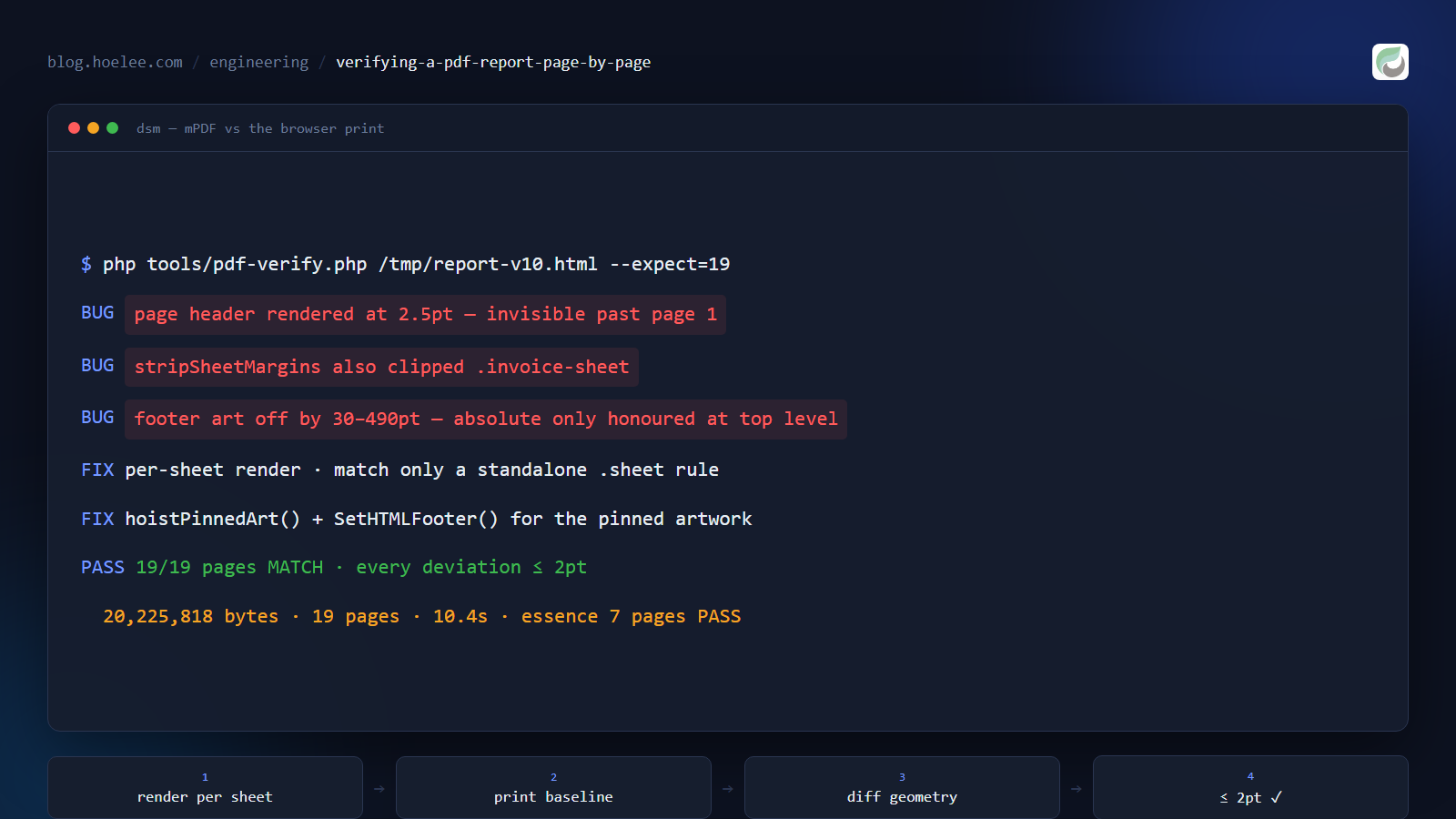
How do you know a generated PDF actually looks right on every page — not just page one? I maintain a CodeIgniter 4 app that turns birth details into a Chinese numerology report. Until recently the operator printed it with Ctrl+P and saved a PDF by hand. I replaced it with a server-side renderer (mPDF), and overnight the product’s quality depended on a layout engine I could not see.
This post is the searchable version of that problem: verifying a multi-page PDF report page by page against the browser’s own print output, with numbers instead of eyeballs. It caught real bugs — a header line rendered at 2.5pt, effectively invisible on every page after the first — and ended with all nineteen pages within 2pt of the browser.
Why “looks fine” is not a test
Nobody can verify a 19-page report by eye. The old ritual was: open the PDF, skim the cover, ship it. A drifting heading on page 17, a footer illustration over the copyright line, an unreadable header — a quick flick never catches those, and the customer who paid sees them at full size.
Naive approaches fail structurally. A server-side PDF renderer does not lay
out HTML the way a browser does, so page breaks, margins, baselines and
spacing all drift — and there is no “looks fine” test you can re-run after
someone edits the CSS. My first single-pass render came out as 27 pages where
the design expects 19 — mPDF has no CSS clipping and the sheets hide overflow
with overflow: hidden. The report’s own @page rule was worse: mPDF emitted
a page break for the rule itself, and 19 sheets exploded into 12,789 pages.
Page counts were not even stable, so eyeballing page one was not verification;
it was hope.
The baseline: make the browser print your HTML
The operator’s Ctrl+P is Chrome printing the report’s own HTML with its print
CSS — same machine, same web fonts. So the reference is not “what I think it
should look like”; it is the browser’s own print output. I served the report
directory locally (fonts must be same-origin or webfonts refuse to load) and
printed with headless Chrome. The report CSS declares @page { margin: 0 },
so the output is borderless full-bleed, and -webkit-print-color-adjust: exact keeps the background graphics the operator ticks:
python -m http.server 8123 --bind 127.0.0.1 --directory <report-dir>

"C:\Program Files\Google\Chrome\Application\chrome.exe" --headless=new --disable-gpu \
  --no-pdf-header-footer --user-data-dir=%TEMP%\chromeprofile --virtual-time-budget=30000 \
  --print-to-pdf=chrome-win.pdf "http://127.0.0.1:8123/report-local.html"
Then the server-side output, from the same HTML, on the VM:
php tools/pdf-render.php /tmp/report-v10.html /tmp/mpdf.pdfCompare page by page, not overall
I compared the two PDFs page by page with uv run --with pymupdf: page size,
text-block count, image bounding boxes (x0/y0/width/height), and caption text
y. Threshold: within 2pt (0.7mm) counts as aligned; over 5pt gets a root
cause. Compare the same element across the two PDFs — never absolute page
counts; page parity is the prerequisite, not the test.
What the comparison caught
Each bug below had a measurable before/after and a fix in the library or template.
The invisible header line. A user reported the small header line, present
on every page after the cover, was unreadable. It is a font-size: 10px div
wrapping an auto-width table whose first cell declares width: 100% — mPDF
read that as “table too wide” and scaled the whole line, font included, to a
third of its size: 2.5pt vs Chrome’s 7.5pt. fixPageHeaderTables() gives
the table an explicit width and font size in points (px → pt) and drops the
offending cell:
$pt = round((float) $m[2] * 0.75, 2); // 10px = 7.5ptThe margin rule that matched too much. .sheet { margin: 5mm auto }
spaces the sheets on screen. mPDF took it literally and pushed the 296mm sheet
to 301mm — past the 297mm page — so the sheet was cut at the page edge and
auto-fit shrank the whole page by 3%, white border included. Appending .sheet { margin: 0; } does nothing — mPDF honours the first rule for a duplicated
selector. So the library rewrites the rule in place (stripSheetMargins()),
and the matcher must not over-match — the guard is a negative lookbehind:
'~(?<![\w.\-])\.sheet\s*\{([^}]*)\}~i'That matches a standalone .sheet rule only — a selector like
.invoice-sheet (a class whose name merely ends in -sheet) is left alone,
so the stripper cannot clobber unrelated rules. (The receipt is a separate
one-pager — more below.)
Footer art off by up to 490pt. The sheets pin illustrations to the page
bottom with position: absolute; bottom: Npx. mPDF honours absolute
positioning only at document top level, so inside a sheet these images fell
back into normal flow: 30–490pt too high (page 6 was 213.5pt — 75mm —
off), and 10% too narrow (450pt vs Chrome’s 499.5pt), because percentage
widths resolve against the 189mm content box instead of Chrome’s 210mm
containing block. The fix moves every bottom-pinned image into mPDF’s HTML
footer (SetHTMLFooter()) — page-anchored, outside the body flow. Result:
within 2pt. The “10% too small” bug disappeared with it — one root cause.
22 centred headings were flush left. The templates centre with the legacy
<center> tag; mPDF 8’s Center handler is an empty class, so the tag is
dropped and every centred heading and table came out left-aligned (the preface
heading measured x=30 against Chrome’s x=280). expandCenterTags() rewrites
<center> to <div style="text-align:center"> and adds align="center" to
tables inside centred blocks, because parent text-align does not reach
tables. After the fix: x=281, Chrome 280.
Line spacing 15% taller than the browser’s. The template’s normalize.css
declares html { line-height: 1.15 }; mPDF does not inherit it and fell back
to its own font metrics (1.33) — 20–40pt of drift accumulated on the lower
half of every page, and sheet 3 overflowed onto a second page, triggering a
whole-page shrink. Setting useFixedNormalLineHeight to the template’s own
value brought body leading to 15.5pt against Chrome’s 15.7. Tables needed td, th { padding: 1px } — mPDF’s default cell padding is 2px larger than a
browser’s.
The fonts were wrong. mPDF cannot read the .woff files the web views
use, so text fell back to its built-in Sun-ExtA, and “Microsoft YaHei” does
not exist on the Linux server. I registered the real TTFs — MaShanZheng for
headings, Roboto for Latin, wqy-microhei for CJK — and mapped the template’s
stacks onto them. One trap: mPDF’s automatic script-to-font selection must be
off, or it picks the first registered font that supports Chinese — the entire
body came out in handwriting.
And one bug that had nothing to do with mPDF. Page 7’s main illustration
was broken in both PDFs — the same broken stub in Chrome and mPDF. The
template hardcoded https://cdn.hoelee.com/..., a domain that no longer
resolves (NXDOMAIN), so every engine fetched nothing. Fixing the template to
use the app’s own base URL and mapping any host’s /static/ path to local
files restored it in both engines. Only a side-by-side comparison surfaces
this — each engine alone looks “fine”.
One sheet, one page
The library splits the HTML into its <section class="sheet"> blocks and
renders each sheet as its own one-page document, importing page 1 and merging
— a physical guarantee that one sheet is exactly one A4 page, never split
across pages. mPDF measures CJK text widths slightly differently from Chrome,
so some sheets come out a few millimetres too tall. Rather than lose content,
the library re-renders the sheet at the smallest scale factor from a ladder —
1.0, 1.005, 1.01, 1.02, 1.03, 1.06, 1.10, 1.15, 1.22 — that fits, shrinking
the whole sheet instead of clipping. The browser’s print clips with overflow: hidden; a PDF that silently dropped in-sheet content would be a delivery
accident, so the design never drops content. Sheet 3 needs x1.005 today (0.5%,
invisible) where it used to need x1.03.
What “19/7 pages” means. The report template always renders nineteen
sheets in a fixed order; the “edition” is a filter over those sheets, not a
second template. The full report is 19 pages; the RM49 essence edition is
7 of those 19 sheets, renumbered, each selected sheet carrying a marker so
a rearranged template fails loudly instead of shipping the wrong chapters.
Both editions run the same pipeline and verify the same way:
tools/pdf-verify.php --expect=19 and --expect=7 both PASS — page count
plus a per-page ink check (ghostscript at 50dpi) proving no blank pages.
Why the invoice is a separate document
The receipt is not a cut-down report. It is its own one-page A4 document: real
16mm page margins (the report is deliberately full-bleed), three languages,
and a single-pass render because there are no sheets. It is generated lazily
at email time — the payment callback must answer in milliseconds, and a 0.3–1s
render does not belong in it. It lands in the same delivery store under a
-receipt filename, never colliding with the report file, and it is
idempotent: retries get the same file. Even one page differed from the
browser: display: block on <small> was ignored, side-by-side tables
clipped the right column’s values off the page edge, and the total row had to
live inside the items table or its label floated in mid-air.
What I’d do differently
The method lives in the project notes as a documented ritual, not a committed script — that is the gap. The repo’s automated acceptance tool proves page count and per-page ink, which would never catch a 2.5pt header or a 15% leading drift. I would turn the browser-baseline comparison into a script in the repo’s verification tooling: render the same HTML in Chrome and in the library, diff the geometry, fail on any deviation over 5pt. Then a CSS change that silently regresses the print layout fails the build instead of reaching a customer.
I would also have generated the Chrome baseline before writing any mPDF compensation code — “print with the same engine the operator uses, then measure” was the unlock. Two honest items remain: the partner and family reports have not had this page-by-page pass yet, and the 19-page PDF (20 MB with backgrounds and embedded fonts) still needs compression before delivery.
The result
Full report verification, after the fixes:
$ php tools/pdf-verify.php /tmp/report-v10.html --expect=19
out  : 20,225,818 bytes, 19 pages, 10.4s, peak 188 MB
per-page ink check: all pages have content  |  report pages=19
expected 19 pages => MATCH
RESULT: PASS- 19 pages vs the Chrome baseline’s 19 — MATCH, one A4 page per sheet, no splits.
- Every measured deviation is within 2pt (0.7mm) of the browser’s print output: footer art 213.5pt off on page 6 aligned, header restored to the browser’s 7.5pt, centred headings back, leading 15.5pt vs 15.7, embedded fonts matching the web fonts.
- The ink check confirms no blank pages, and the PDF text is extractable — the cover reads back as real text, which matters for a report customers copy from.
- Essence edition: 7 pages PASS, 4.99 MB, 2.8 seconds.
That is the difference between “the first page looks fine” and “all nineteen pages within two points of the browser”: the first ships when you eyeball a PDF; the second is what you get when the browser itself is the test.
I build web applications and print/PDF report pipelines like this one, and I do website design and development. If you have a document your server renders — a report, a receipt, an invoice — and you want to be sure it is right on every page before it reaches a customer, tell me about it: WhatsApp · [email protected] · hoelee.com.